

One of my pet peeves with some blogs is the lack of static pages, which can make browsing and finding information a complete nightmare.
By default, most WordPress themes are designed to display the content newest to oldest and by category.
While this organization works for some blogs (news oriented), it’s not ideal for every approach — especially tutorial/how to websites.
For example, this blog is not a tutorial blog. It’s my “latest news” blog where I highlight information about Internet marketing, blogging, etc. So I’m OK with having the content primarily sorted and filed by category.
My static site is my tutorial website that explains how to create a website, and it’s my main revenue generator. That’s largely because of how the content is organized — lots of static pages with a logical content organization — which makes the site easier to reference.
Since so many people are opting to go with WordPress instead of a traditional static site these days, I’m going to show you how to make it function more like a static website to help you with conversions, bounce rates, SEO and provide a better user experience for your readers.
This post is fairly long, but stay with me. It could drastically improve your traffic and sales.
The Example
Let’s pretend you are building a website on how to plan a wedding — a topic where the information is best presented in a certain order instead of random posts sorted by category.
Most bloggers would approach this by writing a bunch of posts about wedding planning and file them into various categories. Over time, a lot of the important content will get buried in the archives and there is no logical organization to the content.
So when someone stumbles upon the site, they find the latest posts in all sorts of categories instead of finding an organized presentation that shows all the important wedding planning tips you want them to see.
This can make for a confusing experience for people trying to navigate your blog and find what they need to plan their wedding.
Static Pages are the Answer
I’m sure you already know by now that creating Pages instead of Posts with WordPress is the way to display important content that you don’t want to get buried over time.
Pages should highlight information you want every visitor to read and they should be easy to find every time someone comes to your blog.
The problem is many WordPress themes don’t provide a lot of real estate in the design for you to highlight many of your pages. So you either have to manually edit the code to create another menu (too complex for the average WordPress user), or make do with the menu you have.
Using WordPress Menus
The WordPress Menu feature is really powerful. You can take your theme’s default menu and change it into a completely different menu with pages, categories, external sites or a combination of all three!
The problem is, most themes only have one menu. Like many bloggers, you may run out of room and feel limited when it comes to using menus for your blog.
Well, I have been spending time on the WordPress Codex site and learning about theme development. I took the default Twenty Eleven theme and learned how to add two more menus to the header area.
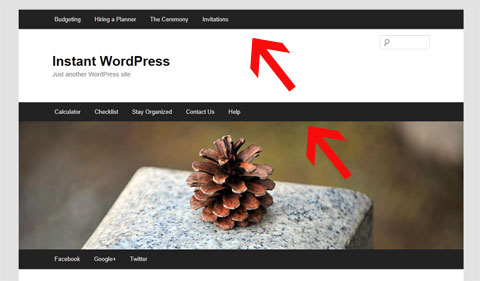
Now, instead of just having one menu below the main image (which I’ve always thought looked a bit odd), you can have a menu at the very top of your site and/or above the main image.
The picture below demonstrates where I’ve added the two optional menus. I realize 3 menus is probably too much for most blogs. So you can use the one(s) you want and disable the one(s) you don’t need using the Menu feature under the Appearance tab in your Dashboard.
You can download my theme here and use it if you like.
The good news is that it’s a child theme. So that means it still uses the original Twenty Eleven theme’s functionality. So when WordPress updates the theme files, you will still receive the updates and not lose any of your own customizations.
Here’s a video that shows you how to activate and deactivate the two new menus I’ve created for my theme.
How to Improve Your Blog’s Navigation
Whether you use my 3-menu theme or not, this section is very important. I will show you how to make your blog navigation more intuitive and useful by using static Pages and the WordPress Menu feature.
You can apply these lessons to any theme, however if your theme only has one menu then it may be more challenging (especially if you want to highlight your post categories in your menu).
Let’s go back to the wedding planning example.
Instead of using your theme’s menu to highlight your post categories that send people to a list of your random posts sorted by date, we are going to create 4 static landing Pages that represent the 4 main topics of your blog. These Pages will be linked from your main menu.
So in your WordPress Dashboard, go to Pages and then select Add New. Create your landing pages. For this example we will name them…
1) Budgeting
2) Hiring a Planner
3) The Ceremony
4) Invitations
The reason I am creating Pages instead of Categories is because we will be highlighting these 4 topics on your navigation menu. And when your readers click on any of the 4 topics from the menu, they will be taken to a static landing page instead of a dynamic page that displays a random hodgepodge of all your recent posts (which is how most WordPress blogs are setup.)
Here is what your first landing Page may look like.
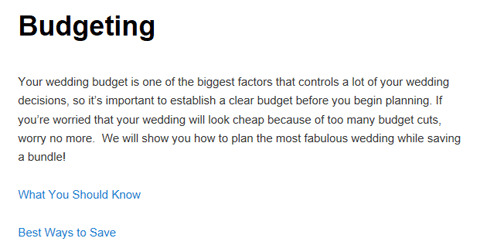
We are going to add these landing pages to the WordPress Menu because they contain important content that your visitors need to read. The idea is we want these pages to remain visible on your blog no matter the date! That’s the purpose of static pages.
Notice the two links below the opening paragraph on the Budgeting landing page. These are links to 2 more WordPress Pages that are “children” of the Budgeting Page.
When you create a new Page in WordPress, you are given the option (in Edit mode) of choosing a Parent for that page. So I created two more Pages called What You Should Know and Best Ways to Save and assigned the Budgeting Page as their Parent. Then I linked them from the Budgeting landing page.
Note: You don’t have to assign a Parent to these pages, but it’s a good habit to get into because some themes (Thesis) will automatically add your child pages as drop-down options in menus.
Now I’m going to show you how to highlight these important static pages on your theme’s navigation menu.
Using The WordPress Menu
When you go to the WordPress Menu section (under Appearance), it will automatically tell you how many menus are available for your theme. As I already mentioned, my child theme will give you three menus. See below…
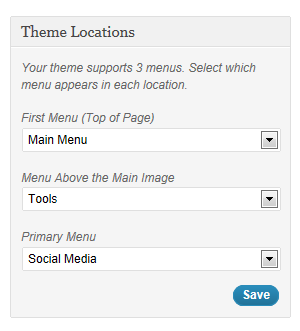
So we’re going to create a brand new menu on the very top of the blog (you can call it whatever you want.) This menu is going to consist of the 4 landing pages we just created (Budgeting, Hiring a Planner, The Ceremony, Invitations) and any child pages you created.
The child pages will show up as drop-down options underneath the main topic as illustrated below…
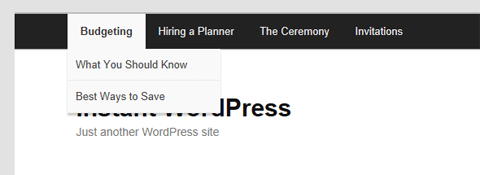
Once you’ve created your Pages, setting up this kind of menu is super easy. Just go to Menu under the Appearance tab in WordPress and click the + sign to create a new menu.
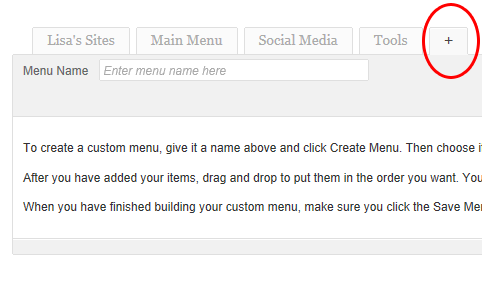
Name the menu whatever you’d like. I named mine “Main Menu” since it’s at the top of the blog and links to my most important topics.
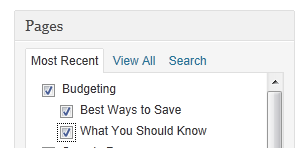
Now you’re going to add your 4 new landing Pages (and their children) to the menu by scrolling down to the Pages section and selecting all the appropriate pages. See screenshot below where I’ve selected the parent Page “Budgeting” and all its children.
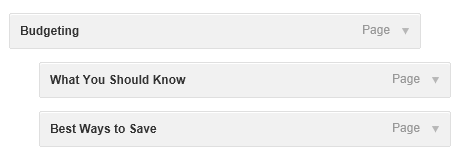
Now we want to make sure the child pages show up as drop-down options when you hover over Budgeting. You do that by simply dragging all the child Pages over to the right so they are indented. See screenshot below…
Repeat this for all the Pages and children you want to add to this menu. Save your menu when you are done.
Now when you refresh your blog you should see your main topics in the new menu. When you click the main topic (Budgeting, for example) it should go to the static landing Page you created.
When you hover over each topic, it should also display the child pages as drop-down options.
What About My Posts and Categories?
Don’t worry. I’m not suggesting you abandon creating Posts and using categories. Obviously you still want to keep creating and highlighting new content.
I’m just trying to help you improve your blog’s navigation so your readers can find your most important (static) content. When you have a tutorial/how-to site there is certain content that should always be accessible. That’s why you want to make good use of Pages and highlight them from your menu(s).
There are a few ways to highlight your recent posts and categories on your menu:
1) Simply add the Categories to your menu like you did the Pages above
2) Use my Twenty Eleven child theme and reserve one of the extra menus for your Categories
3) Create a new Post category called “News” or “Updates” and make all your existing Post categories children of this new category.
Add the “News” category to one of your menus and the sub categories as drop-downs underneath. Now your readers can find your most recent posts and view by category if they wish.
Now you’ve got the best of both worlds with WordPress. You can feature your most important and potentially highest-converting static content while continuing to highlight your recent work (latest posts).
Benefits of Implementation
- Static pages make your blog easier to reference and they improve your visitor’s overall user experience.
- When your navigation is logical, your readers can find what they need and they are more likely to return to reference your content. They will also stay longer and view more pages (improves your bounce rate).
- When people return, they are much more likely to buy products you recommend and sell, which will increase your blog’s revenue.
- This can also be beneficial for search engine optimization because your content is organized logically and it gives the engines a better idea for what your site is about. Having more static pages can potentially boost your search engine traffic in the long-run.
What About Other Themes?
I chose this theme because it’s the WordPress 3.0 default and everyone has easy access to it. Unless you’ve removed it, you should still have it installed. Also, it would be quite difficult to explain this for every theme since the code is drastically different.
This is a great example of when premium themes like Thesis come in handy. You can actually create drop-downs in your navigation menu without having to edit the WordPress Menu. It’s part of the Thesis Options panel. So Chris Pearson was actually ahead of the game when he created Thesis.
![]()
The Twenty Eleven theme also has extremely clean code and is a good theme to use if you’re interested in learning more about theme development and modification. You can really do a lot with this theme if you spend time learning about the inner workings (hooks) of WordPress.
——————————
I really hope you found this post useful. I know it was lengthy, but I want you to understand how important site usability really is. If you need a theme with more menu support, be sure to download my Twenty Eleven child theme.
In my WP Starter Guide I go into greater detail about this and even show you how this tip has impacted the traffic on my hair blog.


Hi, my name is 

nice article
Well, thanks to you, I learned CSS and HTML and made sidebar nav menus for a couple of my sites. I just drop the code into Thesis Open Hook and play with it till it fits all the browsers I have installed. I know I’m backward, but I’d rather learn code than learn how WordPress works (smile).
Hey Lisa, I was thinking about this topic last few days and planned to make my navigation a bit better. I will have to add a second menu to thesis so I will have to figure it out. I had one for categories but kept messing it up cause I wanted it to look differently than the main menu
This is a nice push for me, just what I need to play with this week.
Also, as far at the WP default theme goes, it is one great theme to customize and it is the only free theme people should stick with instead of installing those with piles of hidden code.
Just found your comment in the spam folder. Yikes! There are quite a few tutorials on adding another menu with Thesis. I think this is the one I tested with on my local platform http://www.emptycabinmedia.com/thesis-theme-add-another-menu/
you never fail to inspire me…i’m about to create a wedding ”how to” website in our country since i am also a coordinator. Ur blog is just on time. *hugs*
great post and a big reason why many initially “shy-ed” away from using wordpress as a static niche website platform. each of my niche websites is designed the old fashioned HTML way, with the exception of my newest experiments which are in wordpress. the overall experience is much better. i am now interested in observing the advantages of using wp over the old fashioned static HTML website utilizing the same marketing methods.
I would like to create a website that has daily tips on house cleaning, organizing tips, kids, cooking, recipes and just great info. i love scouring the internet on topics like these. I’d like to create an all in one place for people to go to. how can i do this and also do affiliate marketing from these topics. I’m kinda stuck on the “begin” process. if I start with SBI, do I have to brain storm it on each topic? if anyone has any suggestions on how I can get started I would really appreciate it. Thank you!!
RLP
I would narrow your topic down to something more specific. It’s easier to get ranked if you just focus on one niche (kids, etc.). SBI! will help you do the keyword research and narrow down the best topic based on demand.
Thnx for this awesome post. Gud work must be appreciated.
I’ve been using the WordPress menus on my site, and it’s been so helpful.
As I was reading the portion about using static pages even in blogs, I realized that there are a couple of posts that would be more effective if I convert them into pages rather than just being a regular blog post. I’m going to follow your suggestion and fix up them up right now. Thanks!
Wow!
That’s really helpful Lisa. I think I’ve always avoided using wordpress just for this reason. What you’ve shown here eliminates some of my misgivings regarding WP, thanks!
Static pages does work but feel for me tags and categories work better. Guess it different on different types of blogs.
Always inspiring from you Lisa, hope this post also work well for me.
Thanks for the tips! I am definitely going to add some more static pages to my blog now.
Great article! Thank you so much. Great info and well presented. I’m rather new to the blogging world and am still very much trying to find my way. Fortunately for me I have used the same theme which you have modified. I’m sure I will find many wats to benefit from more flexibility in menus. Thanks again!
Bruce
That’s great, Bruce! Enjoy the theme.
I just checked your blog and see you are already using it. Wonderful!
Great post!This is a well presented post..Thanks a lot for sharing it..Keep it up!
Thanks for the tips! I plan on making my more important posts into pages now as I don’t want them to be buried in the archives.
Just to be clear, the landing pages are sort of like the categories, right? They’re used to organize your important pages?
I guess you could look it like that but just to clarify, you are not creating categories. You are just creating a WordPress Page that acts as a landing page for all the important content for that subject. Then you create child pages that are linked from that landing page.
I’m improving my WP navigation now. Thanks!
I use a mix of static pages and blog posts on all my sites.
Use the RSS Includes Page plugin or your pages will not appear in your RSS feed.
Keep it up! I’m sure I will find many wats to benefit from more flexibility in menus. Thanks again!
Hi Lisa,
Thank you for sharing this wonderful post about static pages in WordPress. It is really helpful for as I am new to blogging and started my first blog in blogspot. I should now shift to WordPress to enjoy the benefits of SEO.
Hi Lisa, thanks again for a great article. When I read it, I couldn’t help but feel that I should have done this a long time ago.
Anyway, I have done this in a very limited way by adding a mix of important blogposts and pages in the menu which was fairly easy to do, and it is one of the reasons why I love Thesis!
However, I should already create the static landing pages as you described above which should present my content(blogposts) in a more organized manner because new visitors would really have a hard time digging up the content they are looking for, and I noticed I get a lot of the same questions which have been answered in old blogposts. I guess the challenge later on would be to keep updating the static pages to include new posts about a particular topic.
By the way, I haven’t figured out how to use 2 menus in Thesis. Would you happen to know how this can be done? Thanks again Lisa!
Hi Lisa,
Is your 2createawebsite.com site an example of using static pages? It might sound like a silly question, sorry. I’m still trying to figure out exactly what a static page is without being confused with all the techie terminology.
Thanks
Yes, it just means the pages are organized manually (in a controlled fashion) instead of dynamically like they are with WordPress posts.
I can see how having a static page would be an advantage over having category page if you were giving step by step instructions. On a category page, your first instruction would actually be your last post forcing the reader to scroll down to find the beginning instruction.
Right and if your blog has a ton of posts no one is going to sit there and hunt for what they need to find. They always say you have 5 seconds to give people what they need and if they don’t find it quickly, they’re gone!
thanks lisa… visiting my blog….
My oh my, Lisa, once again you have responded to my energy vibration.
I have been searching for this solution to revamp my Static website for almost a year by now and most of those answers on the internet seems to be in bits and pieces.
But, here you are, providing a “take you by the hand” approach to actually creating it. ( I love you for that! )
Will embark on this “mission” to revamp my website immediately and thank you once again including the universe. The Law of Attraction always works!
William Siong
Learn About Computer And Make Money
Glad I could help, William!!
Hi Lisa,
My only question is:
Do I copy your style.css, header.php and functions.php to the new “twentyeleven-child” folder?
This is a new domain with newly installed WordPress.
Thanks once again,
William Siong
Hi William
No you just install my theme as described in the video and everything is setup for you. It’s that easy!
Hi Lisa,
I had tried creating my new blog using the Theme and tips provided here and I have one Major Question:
How do I Removed or Hide the existing MENU that comes with the WordPress Theme? The one I created was in Maroon and right at the top whilst the Default Menu was in Black.
Looking forward to your valuable advice!
Thanks,
William
Make Money Smartly Online or Offline
Hi William
You can’t hide it unless you physically go into the header.php file and remove all the code.
Ya, the advantage of a static page is quite evidently shown in your article. Great work Lisa. You provided a comprehensive advice on this matter.
there are lots of advantages of using those static pages, your point was well delivered.
Good thing I use Thesis and it makes it a breeze to create such navigation menus… This tutorial is waaay too savvy for me, Lisa! LOL
I recently wrote a post on blog structure that talks about creating static pages vs blog posts and how that benefits SEO – another great reason to follow your tutorial.
Ana
PS Glad to see you are back to using CommentLuv, Lisa – I am adding your site back to my new CommentLuv enabled blog list; it just wasn’t the same without you there, LOL!
Awww, thanks Ana!!
I am so glad to have that issue fixed.
Hi Lisa,
I too had implemented a similar approach of static pages instead of posts which are ignore more often as soon as the no. of posts increases and found it to be quite fruitful but using the navigation as you suggested was lacking in my blog so I have updated and now observing the results. Let’s hope it turns to be rewarding.
Thanks.
- J.
Completely agree with you Lisa, blogs with a blogroll alone just seem quiet hollow to me, always like something it missing.
Good work!
I think most blogs are for keyword stuffing and other SEO tactics. There are some great blogs but again how many people who are transacting business deal with blogs or social networking/ Both of these are all about SEO.
You know why i always love reading your blog… The posts are totally unique and always had been informative and valuable for the readers. Keep up the good job Lisa..:)
Wow! Thanks for this wonderful tips,this would be a big help for me since i am planning to make a new blog for myself. I just hope that things will going to work out well for me.
Interesting. I am planning to add a number of static pages to my blog, targeting the different markets for solar electricity generation and the various options for generating it. I’ll check this out more carefully when I get to that point.
I struggled to see how you could increase your adsense revenue with menus and static pages when I read your headline. However after reading through the post I started to see where you coming from!
Hi Lisa
This post has making me think that it maybe is time for me to do some changes to my menu/navigation. Thank you once again for being a big inspiration for me
No problem, Thomas. Thanks for stopping by!
You know….I have never ever thought about this! This makes a whole lot of sense. I have just been doing posts with some categories. Learn something new everyday! That is what is so great about IM and finding people like you that have so much insight!
Hi Lisa,
Nice tutorial! Be warned to the people who wanted to use these navigation that too much navigation on you site will confuse your readers, might as well planned it carefully.
A perfect lead-in to a WordPress guide I’m coming out with that addresses this very point! lol
Thanks Lisa for your sharing about get high revenue by wordpress. It is really tips.
Thanks again Lisa always pick up a tip or to on your blog each time i visit
That’s interesting to see you’ve hacked the 2011 theme – I’m not a hacker at all (and have never built a site on HTML or otherwise – it’s always been WP for me).
Not surprising, considering your main earner is all about how to create a site from scratch. Mad skillz, mad skillz!!
James, the word “hacked” sounds so harsh and illegal! LOL But I understood what you meant, so thank you.
Great post Lisa. Nav menus really do the trick in helping to improve your blog.
Hi Lisa,
Thanks for the information. I love your blog and wish mine were this good. All of your posts are so detailed and informative. I am just starting to look into the child themes. I see you are using the Thesis theme? It appears that your blog really loads quick and is easy to navigate. Perhaps I need to look into the Thesis theme. Anyhow, thanks for this post.
First of all I would like to say awesome blog! I had a quick question which I’d like to ask if you don’t mind. I was curious to find out how you center yourself and clear your mind before writing. I have had difficulty clearing my thoughts in getting my ideas out there. I do enjoy writing but it just seems like the first 10 to 15 minutes are usually wasted just trying to figure out how to begin. Any suggestions or hints? Many thanks!
Hi Cheryl
Thank you! Ever tried mind mapping? Darren Rowse has a great article on it.
http://www.problogger.net/archives/2007/12/14/discover-hundreds-of-post-ideas-for-your-blog-with-mind-mapping/
I am straight away going to check the wordpress menu for sure…
Its really nice tips. I learn lots of information from this article thank u lisa.
nice tips..I will use it for my blog..thanks lisa..
Again, an excellent article with lot of details. Will try to implement in my future blogs
Thanks for sharing such an excellent and informative article.
I’ve actually done this already to a limited extent on my site intuitively knowing that pages are the bits I want people to always have access to and posts as you say will get buried.
That being said, I have shareaholics sharing icons after each post but not after each page, and comments enabled on posts but not pages, so when thinking about these aspects it could get messy. Any thoughts on that?
Your article does give great food for thought though and made me realise that apart from the point mentioned above, somehow I ‘feel’ like I don’t want to have too many pages but I’m happy to have lots of posts (I guess this ‘feeling; has no merit because in the end they’re largely the same thing in pure HTML terms, both just pages on a website?)
(As you can tell I’m a bit of a n00b)
thanks again,
Alan
Hi Alan,
Right, as far as what the visitor sees, a Page or a Post makes no difference. It’s how you organize them on your nav and make them accessible. Having comments only enabled on posts could get a little confusing to your visitors. I personally have them enabled on all, but it’s really up to you.
thanks for the tips you explained it very well I wasn’t aware about it.
I never though that WordPress Menus and Static Pages could improve my traffic or bounce rate
Thank you sharing information.
I do this now in my blog and test results.
I was just going to release a new wordpress blog, really thanks to update me about menu and pages features and benefits.
That’s what bothers me about my website is the lack of static pages! I really got to fix that.
thank you… really helpful!
Thanks for this article , but i didn’t understand how will this increase my traffic?
Static pages tell the search engines what your site is about and when your layout is comprised of more pages that don’t fall off your site (because of date), it helps the search engines get a better feel for what your site is about. Static pages are also more reference-able and gives your site a more sensible navigation. This lowers your bounce rate which can also improve SEO. My static website 2CreateaWebsite.com gets way more views per visitor because the content is organized logically, not just by date and category.
Great article planning to start a new blog on Investment
This will come in really handy for me. I use a custom theme that was part of a package i bought and to make sure none of my posts get lost i have had to put links to all of them on the front page which looks quite messy. Hopefully your static page method will work on this custom theme. I’ll give it a try
Thanks
Hey Lisa,
So glad I found your post! I’m a fairly low tech gal and have been stumped to how I keep my blog posts visible while using a static page.
Your instructions are very clear and easy to follow.
Thank you so much!
Now…how about how do I take the comments box off of selected pages? (using Twenty Eleven)
Thanks again!
Karen
Great, Karen! Edit a Page/Post and look for a tab called “Screen Options” near the top/right of the screen. Expand that and make sure the Discussion box is checked. Now scroll down in “Edit Mode” and uncheck the box that says “Allow Comments”.
This is really a great set of tips. I only wish that there were decent themes where pages could have categories and sub-categories… A small question, does having multiple static pages affect the pagerank of a blog?
It’s not about the static pages. It’s about how you organize your pages to tell the engines what your site is about. The idea behind using more static pages is you have content that is always visible. These are your important pages that you want the search engines to see. Your visitors also stay on your site longer because they can navigate through your site. The longer they stay, the lower your bounce rate and bounce rate is a very important factor with SEO that gets overlooked.
Thanks for the post. I have been blogging since a week. Hope this helps me .
Interesting, im starting to find wordpress restricting and was thinking of switching to the very Daunting Joomla, this may delay it a bit so yay
Wow thanks Lisa for the tips, I think it will useful for me, because I just build my new website with wordpress.
Thanks
Very thankx for such a useful post, well i am not a regular visitor of your blog. but i am following this blog and your website :2createawebsite.com from 2 years. Now i am going to start my new technology blog and try to keep my focus on specific topics and will create static pages for that topics. thanku once again
I found your article on the right time, I am about to set up a personal blog with WordPress and as I would like to have some pages with static information about certain things I am trying to figure out the best way to set it up, your article gave helpful ideas, thanks!
Lisa, I have often wondered how this is done. I’m glad you are addressing this issue. It’s relevance is particularly noted when you want to continue on a topic or trend that you started some time ago, but were not able to complete.
My other solution, which was to create pages inside my cpanel, is not as good as yours, since I lose connectivity to the flow of the blog, as well as lose the look and feel of the wordpress pages. In other words, my static page usually ends up looking completely different from the blog and turn out to be source of consternation. Thanks for your help.
I have been using the catalyst theme for my blog sites, one thing I like about catalyst theme is the flexibility to update the CSS and way you can easily assign static pages and organize your sites menus. This is not FREE but you can use the catalyst theme on unlimited sites
You know.I have never ever thought about this! This makes a whole lot of sense.
thank for great article i will use this in my website and i hop my traffic will be increase.
Hello,
I am very impressed about your great website.
So many info and details i heared never befor..
Great job and thanks
Rainer
Hey Lisa -
Thanks for the great information here. I agree with your point you are making here about static pages for tutorial type sites instead of a blog format.
I’ve never really thought of that before but it makes sense. I get caught up into making a of my blogs new content first and don’t make it very easy for my readers to get to other quality blog posts on my blog because they are buried by new content.
I’ve just recently learnt how to setup custom menus in WordPress and it is definitely a lifesaver for me. I now can put some static content at the top of my blog so people can access the information easily and it great and really easy to setup!
Nice Blog.Thank you for the valuable review.Will surely follow it.
thanx for showing me path hope it will increase my visitor and rank coz getting pr rank is like digging mountain with spoon
Yes, creating pages with word press theme don’t let the old pages to become obsolete. So the important content remains highlighted.
Your advise I fell is spot on, pages themselves in my current setup are used as the “silos” holding key information on a topic and then interlinked with other Silo’s if needed.
The point of my posts is to update information / tackle Q n A’s i’e present information that changes, evolves, while the “pages” act as “hold all” of all constant information o a topic.
This I feel works well SEO wise and User-ability wise
Hey Lisa
Great post, I’m a little confused though. I want to have a nav menu just like yours. But from reading this post I don’t understand how to get the posts into the different pages. From what I understand you make a page then make another page and set that as the child. Now when I click on that page, In that page will be the child. So, how do I add a post into a page?
My homepage is a static sticky post. I just created my second piece of content and I want this post to go into the relevant page in the nav menu. Can I do that or does everything have to be pages?
thnx
Alex
I tried removing it through header.php file.It was a success.Thanks for suggesting it.
Oh , Gosh… I wished i also use WordPress platfrom for my business…
it is never too late you can always move to WordPress platform
Thank you for this information, I need to improve the menu on my blog as it is not eye catching enough, additionally the need for subcategories would make my site a lot more user friendly, thanks again!
For me blogging is all about passion, writing on your passion and share it through your related network will increase your wallet weight.
This is great, hope to create a static page too on my new blog.. thanks for sharing these wonderful tips.
Lisa, Dear you are amazing, everytime I come to your blog I get something new. I started blogging my watching you videos on “youtube”. You really helped me a lot. Thanks
Tevin
looking at the customization within the dashboard of my WordPress blog on another domain I own, I think I have the WordPress static page thingy set up properly. however, I just want to stop by and comment this post, and thank you for reminding us of how to additionally customize and optimize our WordPress blogs for better positioning in major search engines. Nowadays, WordPress bloggers have to tweak their blog settings as much as possible in order to benefit from good search engine optimization
WordPress is always a first choice for blogger. It is search engine friendly. Thanks for valuable information.
Currently i am using the blogger but after reading this article now I decide to choose the next CMC(WORDPRESS) for my next site .THANKS FOR SUCH A NICE INFORMATION
wooow lisa.. i had no idea that there are so many things i didn’t knew about.. found some really really good tips in this article.. thanks for taking the time, and hope to read more good stuff like this..
~alex
Thanks for this informative post. I’m really grateful for the Thesis theme which has allowed me to do such. Actually, i set up all my updates, and new information to be viewed on a dynamic page, which doesn’t interfere at all with my overall website.
Hey Lisa,
Great tips! I think I need to implement these on some of my sites that would benefit from a more logical flow of information rather than just a post/date/category/ format.
I also need to take a closer look at pages rather than posts. Unfortunately a lot of themes I like don’t do a good job of displaying pages in a way I find user friendly.
I did have one question, what’s your take on bounce rate? In my mind, it’s kind of a flawed statistic.
On the one hand, a person who doesn’t find what they want on your site would tend to leave the site quickly from the same page they landed on. But, by the same token, if you provide killer content and give the user exactly what they’re looking for, then they might also leave your site right away because they got the info they needed and don’t have any reason to look around at anything else.
So in that regard I think it’s kind of flawed.
doh. this article made me add a couple more to my to-do list to improve site navigation. I have definitely seen behavioral trends on my site especially for those doing research on media influence on children and should really utilize that info to create a static page or a simpler navigation to hone on those users. Another list on my ever growing list of needs..
haha thanks!
You really right guys! Lisa you always have something great for us since then. I admit I am really poor in terms of blog traffic. So, thanks!
Hi Lisa,
I have a question. My site is currently a blog but I want to create a static page for the homepage and create a nav button that reads “blog” so that when readers click the “blog” button, they are taken to my blog. I know how to add a page to my site, but I’m unsure of how to make it so that when readers click the “blog” button in my nav bar, they are taken to my blog. I hope I’m making sense. Any help from anyone would be great.
Thanks
I understand what you’re saying, but since your blog’s homepage is going to be a static page, I’m not sure what you want them to see when they click “Blog.” A page with your recent posts? Categories? You could create a new Post Category called “Blog” and assign all your current categories to have the Blog category as its Parent.
Then add your new “Blog” category to your menu so when people click they will see all your latest content. That’s one way of doing it.
The other thing you could do is create a brand new page and use the WordPress code to call up your most recent posts on that page. This plugin allows you to do that http://www.nurelm.com/themanual/2009/08/21/nurelm-get-posts/ Now you can add this new page with your most recent posts to your nav menu.
Hope that helps!
Hi Lisa,
Yep, when my readers click “Blog” in the nav bar, I want then to see all of my recent posts. Right now if you go to my site you’ll see all of my recent posts and then my categories are located in my sidebar. I want for the homepage to be static and then a nav bar button that says “Blog” that leads readers to my blog. I just need a way to separate my actual blog from the static pages, you know what I mean? So does this still apply to your suggestions?
Thanks
I think I got it.
In your WP Dashboard, go to Settings then Reading.
Under Front Page Displays, change it to a Static Page.
Select which page that you would now like to be your front (aka home or main) page.
Hopefully, you have already created a page called Blog (or whatever you name it) because the next step is change where it says Post page to that page.
Save and you are done.
HTH,
~Ms. Katrina
Early October I revamped my blog to make it more magazine layout style. Hopefully it made it easier to locate information interesting to different readers as well as checking out my static pages for vital information. It is a work in progress. Your insights are always so valuable. Thanks.
Hi Lisa,
You point out some good information, I’ve been following you for the last 2 years….thanks for sharing good info.
Great info and well presented.I’m sure I will find many wats to benefit from more flexibility in menus.
Hey Lisa,
Since I am a newbie in this blogosphere, it is really our main priority to find some appropriate strategies and guides to increase our blog’s ranking and it’s traffic through searching from some other articles. And I am so glad that i came up in this article of yours. Thanks.
I know how to add a page to my site, but I’m unsure of how to make it so that when readers click the “blog” button in my nav bar, they are taken to my blog.
Lisa,
have been running one of the 468×60 banner ads on my site. Just changed to another banner, then found out that the link doesn’t work. Please check these out, as I can’t get any of them to work.
Your Clickbank URL is wrong. It should be http://sgtmac67.2createawe.hop.clickbank.net/
Don’t know how I screwed it up, but it works now! Too bad, i didn’t notice this a month ago. ;(
I actually wish WordPress had more options for static pages; people keep saying that yes, it can be done, but they aren’t among the templates, as far as those that are easily visible. It can be a little off-putting for those who want to build a non-blog site.
Lisa thanks for your article.It’s so appreciating. I should start a website soon and your article will help me.Thank you.
Plz tell me how i can get indexed in Google in Easy ways plzz tell me…
very nice information lisa,, thanks for thats,,
That’s interesting to see you’ve hacked the 2011 theme – I’m not a hacker at all (and have never built a site on HTML or otherwise – it’s always been WP for me). I struggled to see how you could increase your adsense revenue with menus and static pages when I read your headline. Again, an excellent article with lot of details.
Great tips as usual Lisa
great post and a big reason why many initially “shy-ed” away from using wordpress as a static niche website platform. each of my niche websites is designed the old fashioned HTML way, with the exception of my newest experiments which are in wordpress. the overall experience is much better. i am now interested in observing the advantages of using wp over the old fashioned static HTML website utilizing the same marketing methods.
this is a very interesting post and a very useful tip. THANKS.
I have often wondered about this (I build Amazon sites). It seems most themes have a main page where all your items are listed. When you click on an item you go to that post, review etc… Is it possible to have a second main page within the same theme also with items listed (maybe items related to the main page) which people can click on and go to the post for that item? Is this possible? Please forgive me if this sounds naive but I am very much a noob (newbie) and still learning. Have signed up for your newsletter on your main site and looking forward to gleaning info from your vast experience.
Thanks
Peter
I love how all of your posts are in depth and very detailed. I’ve been reading your stuff for a long time now, trying to get my site ranked high but haven’t been able to do it yet. That stuff comes with time I guess
This is great info. Although I might not use pages now but maybe I’ll apply it in my blog when I want to make some static pages. The static page is good to display important and pillar articles.
Im ashamed to say that i had the hardest time trying to figure out how to add custom menus on word press lol i cant find tutorials on there site but i knew i could on yours!
I never try it but someday i will try it for my site. Thanks for useful information
I have a website(http://mmtstraintimings.in), where I am showing everything on first page and no page refreshes. My website bounce rate is very high.
How to improve bounce rate on my website?
Got to say, I started off using posts in my WP site and like you found that it was harder to rank so started off another site that consisted just of static pages and it romped up the rankings. Somehow, within a month I was hitting PR2 and less than a million on Alexa.
Looking forward to reading more of your blog, may help a beginner like me out
If you are interested in learning to how to make money online as a replacement for a full time job, then you should plan to invest time and energy learning a skill. There are countless prepackaged programs available across the internet that will show you how to become an affiliate marketer, web designer, or SEO consultant.
Completely agree with you Lisa, blogs with a blogroll alone just seem quiet hollow to me, always like something it missing.
Ive taken your advice and created a few Squeeze pages for a couple of categories, unfortunately i cant find a wordpress plugin that will display a post feed on the static pages of that category. settled for widget box in the end but its not ideal
This could be just what I but, but…. I’m trying to move from my existing theme to 2011 so that I can use your menu plugin and I can’t even get as far as uploading a header into 2011 and displaying it. Can’t imagine what’s the matter. I did this fine in another blog that used 2010!
Any ideas please
Thanks for all your information you gave. I’ve simply started web business 1 year ago, and improves with all your site documents. Now I successed to PR3 with my niche, so so thank you.
Initially I started an online business as a way to build a career while still at home. Now I make the biggest paycheck in the house and still have time for all the hobbies and activities I enjoy.” In this day and age people are making real money online. A standard paycheck from a time clock job just doesn’t allow people the freedom to pursue the things they love in life while saving for the future and having a successful career they can be proud of. An online business is the perfect way to work a job you love while setting your own schedule so you have more time for family, friends, traveling and more. Fill out our form today to learn more about the different opportunities which are waiting for you. Achieve your potential and no longer let someone else dictate your worth. Start owning and operating a successful online business today.
Thanks for this great Post. Luckily I found you on the search result. I love your YouTube Video’s too. especially your Video’s about Adsense. Please Follow me on Twitter too.
Good Luck. you can email me though.
Oh my goodness! Awesome article dude! Many thanks, However I am encountering troubles with your RSS. I don’t understand why I cannot subscribe to it. Is there anyone else having similar RSS issues? Anyone who knows the answer can you kindly respond? Thanx!!
Thanks for useful tip! will try and will definetly let you know!
Awesome post! i did not try before, most of time i was sad for my blog bounce Rate but after reading your post i will work on my blog to create new static pages and menus.
thanks for sharing helpfull post.
Having just started blogging I have found this helpful although I struggled with the menus. I have decided to go for a new page where I can list in a sense more important posts. Thanks for the great post
Nice Lisa i am new to wordpress hope you will not stop this awesome blog and keep on providing awesome articles.However can we completely build a static site from wordpress?
Thank.I am a newbie to blogging and this realy helped a lot
Spot on with this write-up, I really believe that this amazing site needs much more attention. I’ll probably be returning to see more, thanks for the advice!
One thing I have done recently is clean up my advertisements on my home page and single posts pages.
It has cleaned up my navigation and made my blog more useful. Now viewers are only getting the most useful ads, not the highest paying or best converting. Always, they are ones I use and love.
It’s an honesty thing. I provide useful and free content, not products and services.
Great read Lisa!
Scott, I did the same thing on my static site and my AdSense earnings have been through the roof since!!
I thought this is a better way for visitors to navigate my site content so I’ve implemented this in a new site that I created recently. Your posting here further confirm to me that I was right. Thanks for the info!
Thanks Lisa for your info! Helped me figure out a lot of things managing my own site.
I had the same problem. My site is tutorial type and I want to use pages instead of posts. After reading this article I got a custom menu going so thanks for the info.
But now I am having another problem Including those pages in the “recent posts” gallery. My theme has a shortcode for displaying recent posts but cannot add pages there. If you know a way around this, may be a plugin for this..That would be a great help.
Thanks in advance.
WordPress is still the best platform for blogging. It is loved by google. What I love it most is the availability of free great themes and attractive designs. It’s features can be learned easily. And by using it’s menus and static pages which is thought on this post, we can assure that our post will be loved by google also.
WordPress is ok if you want somewhat of a complex script in that you have to search all over to find stuff. We have created a website / blogging platform called the Simple Blog which could be considered a beginners website with only enough extras that you actually need. Trust me it’s easy, my son created it for me i kept bugging him to help me do different stuff on our website so he put everything in this script so i could do myself…lol…
I’m currently working on a new site that will consists mainly of static pages, but I’ve decided to use wordpress anyway. Two months ago, I would have waded my way through countless google search results until I stumbled on some useful info, but I’ve learned since then: I came here first and found pretty much exactly what I was looking for. Thank you once again.
You’re welcome, Daniel!
i am new to this blogging, I’m going to try it using static pages within word press blog.. thanks for the informative post
Thanks Lisa for that useful post i really struggle to improve my worpress websites Bouncerate but your post really give me some good ideas.
I personally don’t use static pages because they are very difficult to manage.I use word press and some SEO techniques that improve the website’s visibility and availability to Search Engines.
Thanks,
I have been wanting to do what you are saying for a long time, so this week-end we have added some static pages for our most relevant content.
Thanks:)
Hello, Neat post. There’s an issue along with your site in web explorer, would test this? IE still is the market leader and a big component to people will miss your wonderful writing because of this problem.
I was just reading about this in the codex and I have to say, your article is a lot more fun to read.
I really want to take full advantage of WP Pages and not just use posts. So I’m going to have to come back to this. Thanks so much for writing it!
Great post! I’ve been running my blog for a couple of years now and you’re opening my eyes to tons of things I had no idea about. Just created my first drop down today! Thanks!
That for wordpress only ?
To Bad im use blogger
Lisa,
Thank you!! This finally made sense to me. This was the integration from SBI to WordPress that I needed to figure out and for whatever reason I guess, I had a block and couldn’t figure it out. With Sitesell it was all pages and naturally built the blog function and on WP it seems the exact opposite. I can’t thank you enough. Now I am going to try not to stress about the tons of posts I have and just worry about some future static pages!!! Finally!
Thanks again!!!
Great article . Thancks alot Lisa . Your post will help me much.Thancks again and keep going to post like this .
Hi Lisa,
I’m a bit of a late bloomer though I have been reading your blog for a long time. I’m finally ready to take the plunge, with all the great info you have provided. Thanks a bunch!
Thanx Lisa, for this post, this post helped me to design my menus and pages in a well mannered way, which in turn helping my site to look good and and attractive..
Thanks a lot
Hi im new blgger i ask a quesstion which bounce rate is good my rate is 70%
Hi Lisa! Nice post!
I do really enjoy your blog.. and also your other post about “The Ugly Truth Google Panda Exposed About Your Business”. Anyway, WordPress is really great especially when it comes to building pages, posts and menus. Thank you for these wonderful wordpress tips. Keep up the good work.:) -Anj from Springfield MO
Thanks for coming by Anj! I grew up up in St. Louis so not too far from Springfield. Glad you enjoyed my posts!
I have a website(http://www.mmtstrains.in), where I am showing everything on first page and no page refreshes. My website bounce rate is very high.
How to improve bounce rate on my website?
Hi Lisa, This is extremely helpful. Thank you for the video. I am trying to make two modifications and if you could guide me with it please:
1) I would like to move the top menu all the way to the right
2) Lets say in the Top menu I have options “Menu Page 1″ and “Menu Page 2″. When I click on “Menu Page 1″ I should be able to see the middle menu (only and not the Primary Menu) and when I click on “Menu Page 2″ I should be able to see the primary menu (Only and not the Middle menu).
Greatly appreciate your help. Thanks.
I would like to have some pages with static information about certain things I am trying to figure out the best way to set it up, your article gave helpful ideas, thanks lisa is nice post.
This is a nice push for me, just what I need to play with this week.
Also, as far at the WP default theme goes, it is one great theme to customize and it is the only free theme people should stick with instead of installing those with piles of hidden code.
good traffic idea lisa..thanks for share
Thanks. That’s really helpful Lisa. I think I’ve always avoided using wordpress just for this reason.
That’s really helpful Lisa. Nice post.
Thanks for the tips you explained it very well I wasn’t aware about it. I never though that WordPress Menus and Static Pages could improve my traffic or bounce rate.
Is it just making a website or making a good informative webiste?
I liked this post. In a sense, I think you’re saying that static pages can be the “crash course” which sums up your best ideas. Like how on this very website, you have “The best of…”
The very reason I am reading this post is because you made a static page!