

When I see the “Upgrade” notice in WordPress, I always wait a few weeks before I upgrade.
Why?
Because I want to give developers time to ensure their plugins are compatible with the newest version. Not to mention there are often bugs with the new release.
Well, let me just say I will be more diligent about doing updates in the future.
Last Thursday I came home and went to my blog’s homepage and noticed a strange-looking parse error. No content was loading at all and I couldn’t even login to the admin panel.
Craaaap!
I FTP’d into my server and noticed my theme’s function.php file had been modified three hours earlier. I knew something was up because I wasn’t even home at the time the file was changed.
So I called my host and their awesome support staffer (shout out to Robert!) was able to quickly verify that the site had been compromised.
He asked me if I had upgraded to the latest version of WordPress (3.5). I had, but there was a smaller security update (3.5.1) released on the same day that probably addressed the exploit which impacted my blog.
Fortunately, I had a backup of my original theme files. So I re-uploaded the Genesis Lifestyle Theme and that fixed the issue. Thankfully it only took a few seconds to restore everything.
That led me to think…
There are always tips floating around about backing up the WordPress database, but you should also have a backup of your actual theme folder (located in wp-content/themes on your server).
Remember, your theme files and database are stored in two separate locations.
Take-Home Lessons
1. Back up both your database and theme files. You can download your files manually through FTP or use a plugin like that backs up both. (See Online Backup for WordPress.)
If you want to learn how to manually upload/download WordPress folders and files using FTP, I have a tutorial on my static site.
2. If you’re re-uploading the original theme folder, don’t overwrite the style.css file because it may contain customizations you’ve made.
I was glad I remembered that on Thursday. That would have been a pain to make all those modifications again.
The same goes for your favicon file. If you’ve uploaded your own favicon, be careful not to overwrite it with the original theme favicon (if applicable).
3. Upgrade to the latest WordPress version as soon as you can. Like a lot of you, I would wait because of potential plugin incompatibility.
Not anymore. If I have to disable a few of them, so be it.
4. Contact your theme developer and let them know what happened in case there’s an exploit with your theme.
In my case, it was more than likely a security hole in v3.5 since it happened right before a new security patch launched.
How I Back Up My WordPress Sites
I used to use WP Database Backup which would email the file, but the database got so large, my mail server blocked it.
There is an option to store the backup on your server, but I don’t want a copy of my database just sitting on my hosting account. Too risky.
Now, I just manually download my database through my hosting control panel, and I also manually download the theme files via FTP.
Backing up your database manually is pretty easy. It may sound intimidating, but all you do is login to your hosting account and go to the “Database” area.
Most web hosts have phpMyAdmin installed…
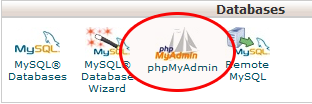
If you use cPanel, just click the phpMyAdmin icon and it will take you to a screen that allows you to export your database.
Select the following options in the screenshot below, and a download of your entire database will begin.
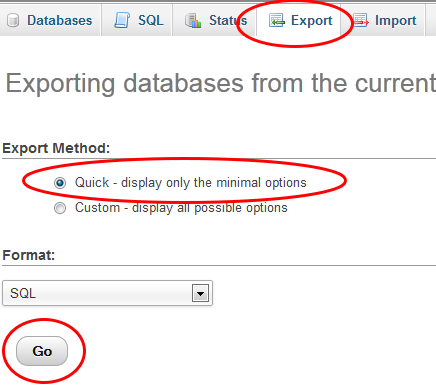
Your screen may look a bit different depending on the version of phpMyAdmin you have. This is 3.5.5.
When it’s done, you will have an .SQL file on your computer. This is your complete WordPress database with your posts, pages, and comments.
Yes, you can use the WordPress Export feature in the Tools menu, but I like having the entire database structure.
And I know plugins are convenient as well, but I just feel more comfortable doing the backups manually because I can physically see that it’s being done correctly.
I’ve heard stories about people using plugins, only to realize (when it was too late) that the plugin wasn’t backing up correctly or completely.
When’s the last time you did a full backup of your site? Please share your routine.


Hi, my name is 

Hi Lisa. These things really suck when they happen, and I am glad that you were able to put your site back up quickly and smoothly. Good thing you had your backup procedures well laid out. This happened to me on several occasions already and while you are right that there are many out there that says to “wait” a bit before upgrading to the latest version of WordPress, I think that the sooner its done, the better. Thanks for writing this up, I sincerely hope that anyone who reads this finally understands that there is more than just relying to “automated backups”, plugins and worst, not doing any backup at all.
Hey DiTesco
Thanks for stopping by. Yeah it’s no fun, eh? It’s just crazy to me how people get their jollies by screwing up other people’s stuff.
Great reminder! Computer mumbo-jumbo like the phrase “back up your database” scares me but I lost my site once and paid a grip to get it back. So I know it’s necessary for sure.
Yup! Scary stuff!
I think having your website being hacked is probably the scariest thing that can happen to a webmaster. I know for sure it’s my biggest nightmare!
To put it in comparison, if we didn’t have backups it’d be like a retail store getting burned down! Quite the catastrophe!
Hi Lisa,
Thanks for sharing your valuable information through this post. It teaches everyone to keep up the backup files before implementing with the new ones.
Thanks,
Anant
Hi Aniket
you missed one thing that it also teaches.
“Wait , Analyse,& Use.”
She also mentioned that she wait for some day after new plugin is released to collect its report.
Lisa, that’s scary! I’m glad you were able to restore your site quickly! One thing you didn’t mention is is there anything you have done to make sure the hacker can’t come back in? I have heard that hackers always create a secret backdoor for themselves, so even if you restore your site they can come back.
As far as back-ups I use the Cpanel back-up wizard. Is that good? It does the same thing you mentioned, isn’t it? Back up the home directory and all of the databases. I save them to an external hard-drive. Am I doing it right?
Also, you didn’t mention how often do you do a full back-up? I back-up the home-directory once a month and the databases once a week. Is that okay? How often do you do it?
Good point. I had my host scan the files to make sure there was nothing added because as you said, a lot of time hackers leave files in strange places so they come back and do further damage. I should update with that tip too.
The cpanel backup wizard is fine. I’ve used that when switching hosts and everything restored just fine.
Wow, this is one of my worst IM fears. I always update as soon as I notice new WP updates have been released. I wish there was a way to have your sites update automatically.
Hi Lisa,
This is a blogger’s worse nightmare!
As much as I love self-hosted WordPress and all the plugins that we can install on top of it, this is one aspect of self-hosted blogs that I don’t care for. Most of the plugins we use are free and many times there is no real incentive for developers to drop every project they are working on to update a plugin that doesn’t make them any money.
On top of that there is always someone out there who will spend a lifetime trying to figure out how to hack into our sites “just because”.
I’m not as technically savvy as you and I use BackupBuddy which at least gives me a feeling of security and that I can restore my blog if and when this ever happens.
Thanks for sharing your tips and advice.
So true, Ileane. It’s always a risk but I guess it just comes with the territory, eh?
At least you have *some* kind of backup. A lot of people don’t backup at all.
Hackers have been around ever since computer programming became popular. There is another very popular tool for hackers to break into a database. Its popularly known as SQL Injections. The term SQL is associated with database and its a language used to communicate with database objects like a Table. The table stores the data which is queried to fetch data. The SQL injection is a combination of queries with which the hacker tries to break into a database table, either to manipulate or erase the entire data from a particular table.
Regards
Arun
Hey Lisa! Ever have second thoughts above leaving blogspot?
http://blog.2createawebsite.com/2007/12/26/i-ditched-blogger-hello-wordpress/
What should someone moving to WordPress (someone who is very attractive to hackers and crackers) know about the platform, and should they be more vigilant or hire a “web watchdog” to keep the blog secure? http://dave-lucas.blogspot.com/2013/01/xiaxue-blog-moving-to-wordpress.html
Absolutely no regrets! I cannot imagine running a blog on a free server. If you think WordPress is risky, it’s even more risky to run a site on something you don’t own. I know of countless people who have had their Blogger blogs removed for one reason or another. To me that’s even more risky.
All of this just comes with the territory and you just have to be prepared to deal with it. My forum has been hacked more times than I can count.
This site is on a dedicated server and I just moved to LunarPages after a terrible experience and security issue with Hostgator. It was so reassuring to know that their support team acted so swiftly and thoroughly. So that gives me peace of mind too.
The best advice I can give is to always have backups and keep your WordPress AND plugins updated at all times. But this is not a reason not to use WordPress, in my opinion. No regrets at all.
Hi Lisa,
I’m glad that you solved the situation promptly. There are tons of people trying to hack my blog as well and I’m scared of that.
I make database backup very often and I do it manually as there are many threats out there. I feel this is a very tedious job because the database is over 200MB now. Do you suggest a better way to make DB backup easier?
Hi Tuan
Someone (Jon) just posted that if you click the “Custom” button when doing the backup, you can select a ZIP file instead. That’s better than the SQL file because it’s compressed.
Hi Lisa
Maybe it is because that you are that cool that someone even wanted to hack your blog in the first place. Anyway I am glad to hear that you got it all figured out. I do regular backups via FTP and most of the time I remember both the DB and all the files. It has saved me a couple of times. Not from a hacker attack, but from a bad theme and also from myself
I thought that you was way to cool to get hacked
Hey Thomas, yeah good point about us saving ourselves from ourselves with goofs we make on our own. Another great reason to backup regularly!
Hi Lisa,
First I want to say thank you for sharing with us this article.
my blog and website was hacked and compromised by hackers 3 times!!!!
I backup my files (personal and business) on a secure cloud! did anyone checked the new site from kim dot com?
Hi Lisa,
thanks for that. Your post was the boost I needed to get my acts together.
Not only have I backed up my blog on my hard-disk (125MB!!), but I have done the long awaited upgrade to 3.5.1 (from 3.4…).
I must confess so far I have used a plugin and the automatic backup that my host does on my web space. I guess that if I got hacked for real that may not be much good…
Thanks again.
I use BackupBuddy, which makes a complete backup of all my sites every night (files and database) and sends the backups to my Dropbox account. BB also has a restore feature that I’ve used about a bazillion times. It’s expensive ($150 I think) but it has paid for itself many times over.
Was your host able to identify how the hackers got in?
By the looks of of it, it was a security hole in WordPress 3.5. My database wasn’t compromised which is good, and they did not get in through the backend (hosting level) so the damage was minimal.
Tip: When backing up via phpMyAdmin, if you click the “Custom” button, you can tell it to zip (or gzip) your SQL file. This makes it much quicker to download large databases.
Great tip, Jon. Thanks!
Totally right. Thanks Jon.
wow,its great tip.
Thanks lisa
Why would anyone hack your site and not do anything… Well I doubt if someone really hacked into your site maybe your server host did something wrong or something else we can imagine.
They did something alright. My entire site was blank with the exception of the parse error. If there is an exploit with a WordPress script, they can change the theme files. Happens all the time. There would have been no reason for my host to change 3 random theme files — especially the 3 most important WP theme files and nothing else was touched. This was clearly from an exploit in WP 3.5.
And I also forgot to mention, we looked up the logs and it was clearly an edit from an IP address. I saw the log. It was indeed a hack. Your host can verify this pretty easily by looking at logs.
Rahul, if you ever visit a hacking forum you will see that there are 2 types of hackers, those that do it for intellectual challenge and others focused on personal gain whether financial or egotistical.
Clearly Lisa was hacked by one of the latter as the rules for the intellectual hacker are quite straight forward, get in leave a calling card but do not damage the site in anyway.
As painful as hacking is, it is a great reminder to us as a community that the ability to reach everyone online is a double edged sword, yes we can engage with almost anyone however in return the undesirables can also attack our presences, thus we neglect security at our peril.
igor
Very well said.
My site was hacked about a month ago.I did not have any back up and I had to restart my 2 month blog from start.It was a mistake I will never make again.Cheers!!
Ugh! That sucks, Justice. I guess sometimes we have to learn the hard way huh?
Thank you Lisa for those very interesting tips!
Was of alot of help!
Keep up the good work and keep us posted!
Hopping to read more from you,
Backup files…I always have that one in case I ran into an emergency situation such as being hacked. Thank you Lisa for sharing this.
You are right lisa. the same occurred with mine how to sell my car and it had my seven month hard work on it.
I always wait a bit when the major releases come out but when small security updates are released (like 3.5.1) I will update straight away, I’ve seen far too many people around me fall victim to hacking attacks to risk my income.
Backing up the site as well as the database is fantastic advice that everyone should be listening to, I’ve been doing it for a few years now and it doesn’t take too long.
Seriously, who wakes up one morning and decides, today is the day for hacking, really, do these people have absolutely no lives, so to hear that Lisa and on that note, I am off to my host to update and back up my files. Hope you didn’t loose much.
Why would someone do this at all? A jealous competitor, a mischievous bored person? Click bombing is one thing but to hack a site is really nasty.
It goes to show, the easy road becomes harder and the hard road becomes easier. I’ll be exercising more due diligence in future. In fact, I think I’ll do some backing up of my PC data in general..
Thanks for the reminder Lisa, I’ll do backup of my blog now.
1 thing I didn’t understand. Why to choose “quick” database export option in phpmyadmin instead of “custom”?
Thanks Lisa for sharing your experience. This happened to me just about a week ago trying to login to my Admin but it was also resolved. I had a similar experience last year on another domain where I wish I would have had a WP backup for all the files. But now that I have this WP plugin, no more worries. However, for another great post!
I’m glad you sorted out the hack in no time Lisa. My site was recently hacked too, my host sent me an email and we were able to fix things in no time. My site is static which means I have all the files on my PC already. This is one of my phobias for blogs (having everything serverside) but it’s good to know that you can manually download the databases via FTP because, like you, I prefer doing some things myself to be sure that it is done!
Definitely bookmarking this for when my blog goes live! Thanks.
That’s the one big advantage of static sites. You can have an exact backup of the site all in one place. Glad you got your issue sorted out too. Good to see you here again!
Glad you backed up the site and was able to get it back up and running without any loss (except a little time). Backing up your site always seems like a “waste” until you actually have to use it! Thanks for posting this, definitely a lesson well learned to update our blogs ASAP.
Is there a WP plugin you can recommend for backing up files? I tried the one you mentioned but it’s very old! LOL.
A lot of other people here have recommended Backup Buddy. Never used it though. I only do the manual method. Not a fan of plugins for backups.
So lucky you knew something was wrong right away, Lisa….
Just followed your directions and backed up my database; never realized it was so simple.
Question: so how do I know that the export was successful?
I’ve tried it twice now (each time for 30+ minutes) and each time the dashboard says “Exporting…”, but never something like “your export is complete” or anything else to let me know it was done…
PS No CommentLuv?
Did you do a Custom Export? You should get a window prompt like you do when you are saving something to your computer (where you choose the location). Once it’s done, the window goes away and the file is sitting on your computer in the location you specified.
If you are using an older version of phpMyadmin you may have to choose the “Save to File” option. But it should only take 1-3 minutes unless your have a HUGE blog.
Re: CommentLuv – I have been having server issues for nearly 2 years. Something on this blog was causing my entire site to crash and go offline every 3-4 weeks (and I’m on dedicated hosting). Such a headache.
So I used a plugin to track which plugins were using the most resources and CommentLuv was on top. So I disabled temporarily to see if I can pin it down to that. So far, no crashes after 4 weeks. So it’s not looking good for CommentLuv. Still no confirmation as it’s too early to tell but I may have to permanently disable.
I also saw Andy recently released an update and he mentioned something about “your server will thank you” so that also made me wonder if it was indeed a resource hog. Maybe now that he has updated it I may give it a go again. But for now I want to see if I can confirm it’s really the cause.
*Fingers Crossed*
I suppose that’s what happened – the file was loading, then the download window disappeared. I assume that means it was downloaded properly.
Just goes to show how non-techie I am…
Don’t tell anyone!
CommentLuv: I know what you mean; it does consume quite a bit of resources. My feeling about it thus far was the fact that it did add a lot of value on my blog, but at what expense, right?
Keep me updating on what your final decision will be.
Actually you are downloading your whole database as a text file, thus taking so much time to export. Export using custom mode and gzip enable will reduce the size and you will be able to see the whole backup file in your desired location.
Well that is kind of messed up that this happened to your site. At least you have a good backup plan in place a lot of people don’t until it’s too late and the damage is done. Backups are certainly very important. It is also a good idea to learn how to restore them should the need arise. Some hosts seem to be more helpful than others if you need help. In some cases you end up waiting longer than you were hoping for assistance from the support department.
Glad to see that you’re back Lisa
It reminds me how important update is. I usually wait for a few weeks to update to a brand new WP version (like 3.4 to 3.5), but for security update (like 3.5.1), I think update immediately is a must
Great reminder! Computer mumbo-jumbo like the phrase “back up your database” scares me but I lost my site once and paid a grip to get it back.
Thanks for sharing your valuable information through this post.
You can use security plugins to make sure that your blog is protected. Also use secured SFTP for uploading files. I use Better Security Plugin and a couple of .htaccess hacks.
Gosh, Lisa.
I’m glad you were able to get your site back up. I should really pay more attention to backup and security. I really don’t know too much about it. I have the WP back up and security plugin running on my blog and its suppose to be sending all of my files to my dropbox account. To tell you the truth, I have no idea if it really is or not. Plus, I’m scared to update wp because when I did it a few times before, my entire blog disappeared!
Having your blog vanish is a horrible feeling, especially when you don’t know how to get it back. I’ve had to start over from scratch several times in the past, which was even more of a headache. Luckily the last time it happened, my hosting provider was able to restore it with no problem.
This is exactly why I need to figure this whole backup/security thing out asap, plus get a better theme.
I would SO panic if my site was hacked. Thanks for sharing your experience with us and the resources.
Ti
Sorry to hear about someone breaking and entering. When it happened to me I was so dissappointed because I’m a computer guy from the heart. I should have know to take every precaution available. The good news is I had done several backups and just decided it was an opportunity for me to do a new site design. Excellent take home lessons.
Mr.MakingUsmile
Hi Lisa,
Sorry about getting hacked. This is a major eye opener as I wouldn’t have thought someone like you with what you do for a living will possibly show up on a hacker’s list. I need to seriously look into the back end of my site and make sure things are on the lock down.
Thanks.
Hi Lisa,
Oh no! I’ve been hearing about a rash of hacker attacks lately. So much so that I’ve just researched and written 5 articles covering every aspect of hacking prevention…I hope I’ve covered them all, anyway. Including a Security Check List for Bloggers.
If you or any of your readers want to find detailed step by step ‘how to’ articles on Updating WordPress Safely, How to Make Super Strength Passwords – That you can Remember, etc. etc. etc. visitors to my blog are more than welcome!
Ok, so this is a bit cheeky…but please, if you don’t want this post to appear on your blog, please don’t approve it – and no hard feelings.
I can’t help noticing that I thought this blog had Commentluv installed (as I do) but today I see no Commentluv options here in your Comments section. So I’m just wondering why?
Hi Lisa!
Glad you got it back. It has happened to me twice that a hacker hacked my blog. But thanks to my programming team they recovered it and created backup for everything. It is very easy for anyone to hack a WP blog. I dug a little about who hacked my blog and I was shocked to see FB fanpages about hacking and there are many communities of small hackers who do this to test their skills. I Would ;love to share this post with others.
Thanks,
Diana
Sorry you got hacked. One of my clients got hacked also. Now I recommend this two plugins: Wordfence > http://wordpress.org/extend/plugins/wordfence/ – A very detailed security plugin that will email alerts about security issues (great for blogs that aren’t updated daily).
And I use an Amazon S3 account with Automatic WordPress Backup >http://wordpress.org/extend/plugins/automatic-wordpress-backup/ – although this plugin hasn’t be updated, it still works with Amazon S3 and last WP update (3.5.1)
Lisa, I’m glad you’re not intimidated by phpMyAdmin. I still am, so I venture into the cage with falconer’s gloves. LOL
My routine dates back to the bad old days when I used to write my posts in the dashboard editor. After I lost one post too many due to gremlins, I composed all of my posts offline, using MS Word. that’s backup #1.
I use the WordPress Database Backup to email the tables to me. Backup#2.
I use TwentyEleven theme with a child theme setup. The Server files and folder structure is mirrored on my hard drive and FileZilla takes care of the odd style.css updates. Backup #3.
All my web folders, including the theme structure I just mentioned, are zipped, encrypted and plopped in Dropbox. Backup #4.
Finally, for quick access, the same folders are backed up to my 3TB external hard drive.
That’s five backups and three of them are automatic! Whee!
By the way, I use Compfight for post images. If I update the post after it has been uploaded, I simply copy the whole thing over my Word document.
Cheers,
Mitch
So here is different a question, I’ve been noticing that hacker has been trying to get into my site. I can see the IP address of the person after they try. Is there a way to block a specific IP address so that the person cant go to my site? Any plugins? how about contacting his/her hosting company?
Any thoughts?
Yep, you can do it thru your .htaccess file. I called my host and had them do it for me. But if you google it, it’s a pretty simple line to add to your .htaccess file which should be located in your blog’s root folder. I just decided to let my host do it. Go get em Joe! lol
I’m sure Lisa will answer your question in more detail, but just to give you a few tips. First of all; yes, you can block specific IP’s. Just go to your CPanel and there will be a section there called IP Deny Manager. Just copy and past the offending IP. Before I do this I also check where the IP address comes from. I use this website: http://ip-address-lookup-v4.com/. You can notice some interesting patterns. Like most of the hackers I get are from Europe. Mostly Spain, Italy, Germany, Turkey… I also use a plugin called Limit Login Attempts (you can find it under the WP plugins section) to prevent brute-force password guessing attacks. And of course alwas back up, as Lisa said…
Great point, Thita! I forgot all about the CPanel option. Much easier!
Thita, thanks for the assist! I use limit login attempts also and your right – the IP is from the Ukraine. Those guys over there gotta get some real jobs and leave us alone lol
Can someone explain how you can tell if someone is trying to hack into your site? Yesterday I had 2 strange entries in my Awstats Referring URLs which were:
38 Page and 76 Hits recorded against “[email protected]” – and
38 Page and 44 Hits recorded against “[email protected]/change-login-username”
the username was the same person for both lines of data in my Awstats Referring URLs list.
The second example above related to a recent article about How to Change Your Login Username, which has that URL…… domain/change-login-username
I didn’t receive any emails or Comments or Contact Me’s for this username. They are not a Subscriber or Registered User either.
Is this someone trying to hack into my website’s email? Or is it something else?
Well that is kind of messed up that this happened to your site. At least you have a good backup plan in place a lot of people don’t until it’s too late and the damage is done. Backups are certainly very important. It is also a good idea to learn how to restore them should the need arise. Some hosts seem to be more helpful than others if you need help. In some cases you end up waiting longer than you were hoping for assistance from the support department.
So true! Thankfully I have dedicated hosting and the support is excellent. That definitely makes a difference and one thing’s for sure, you quickly learn how good the support is when you have a crisis like that.
Lisa, I read your title, RAN to upgrade my site and then came back to calmly read through to the end LOL
quick question for you. how frequently do you do a manual download? i host my sites with bluehost and they do an automatic backup for me everyday. do i still need to log in and manually download that or can i just rely on them to provide the daily backups if (heaven forbid) something goes wrong?
Hi Kola
I try to do them once a month but sometimes I forget.
Most hosts do daily backups but I just feel much more comfortable also having one on my own computer. Not that it’s likely but what if a host is hacked? So it’s always good to have another just in case.
Yup, about a week ago, a hacker stole into my hostgator account that I had about 20 blogs on. Called them up and they quickly unscrambled it. The htaccess file for each blog had a little redirect that sent visitors to some sort of darwin award site. Sneaky suckers!!
I read all these Comments about being hacked and I wonder how strong people’s Passwords are. You can easily create really long, super-strength passwords – that you CAN remember by using acronyms.
You take a phrase that you can remember – for example: “I like to eat thin crust super supreme vegetarian pizzas on Friday nights” and make it into an acronym.
That would be: iltetcssvpofn = 13 characters long. Now add a symbol from the top row of your keyboard and tack in on the end (14 characters). Keep this stem password the same for all your accounts you want to protect.
Now add an additional ‘ending’ acronym that labels each website/account differently, but in a way you will remember. For example: ‘my main blog about marketing’ = mmbam. That would give you a password which is 18 characters long. You can even add another symbol or number on the end for good measure.
So altogether you have a super long, easily remembered password for each important account: and all different. Because you use the same stem with a different ‘identifier’ label ending for each one. You can easily notch up passwords with 18-20 characters like this.
There are no numbers or capitals to remember – although you can add these if you want. You probably don’t need to.
Now go to HowSecureIsMyPassword.net and see how many billions of years it would take a hacker to break in past your password.
Then go to my website
at http://www.MySecondMillion.com to see 5 article on Website Security.
And Lisa: please delete this link if you don’t want to include it – no hard feelings.
Wow, this sounds like a potential nightmarish situation. I haven’t done a backup in a while, but you can be 100% sure I’ll be doing one tonight!
Couple of years ago my entire Cpanel account was hacked,but they did not deleted anything just inserted some strange code,that redirected some of my traffic (i think the importamnt one US,CA,UK).
I had to check every theme file on every one of my site and reinstall WP.
What i have learn untill now is use long passwords (never generated ones),and backup my DB once a day and files at least once a week .
Hmmm it is really a nightmare to every website owner. I have not tried being hacked but, of course, I am very afraid to be hacked.
Yeah, you are right about the gazillion tips on how to harden wordpress security. However, you are also right on the theme files stuff.
Anyway, I am using BackUpWordpress.
Several years ago one of my websites was hacked too, and the hacker manage to hijack some of the files and also deleted quite a few important ones. Due to that experience I learned to become more cautious when installing the website, especially database driven scripts like wordpress and joomla. For many people who are used to auto installation, there are a few things that could end your site in a hacker’s hands, I always make sure that the database prefix that I use is always some different from the default wp_ as it is very easy to guess hackers can inject your database if they are good enough to go through the security. Another thing is the name of your database, make sure they are alway alphanumeric and don’t use words but random alphabets and numbers. This makes it hard to guess and the hacker will have a hard time attacking your database tables.
Also make use of cloudflare or incapsula, they have helped me a lot in detecting bad bots and spammers usually it would be sufficient to keep the bad traffic away from your site as the service will detect any type of scanning or javascript injection. Alternatively you can also install plugins like wordfence or bulletproof security to stop any type of code injection.
Just sharing my 2 cents, I hope this helps.
my dear friend, we all know all these tips but only realize when it happened with our own website, otherwise think our site is immune.
After years of backups, I started using BackupBuddy last year. I can schedule database backups and full backups on different schedules. I’ve been very pleased with it.
Hi Lisa, great tips! Thank you
I made quite the same experience couple of month ago. Unfortunately i had no backup… Now i know better. And i will never ever forget to upgrade. You made that clear
Thanks a lot!!!
This is great advice. I want to create a system for protecting against site compromising. This will be a great start. Thanks Lisa.
This is my first time in your blog site…but i tell you i am scared about hacking, that is why i am always prepare and having a backup files…
thanks.
Great point . Well detailed . Thank you
this is why i say online business is risky if even blogs of experts like you can get hacked.
Yeah, I got hacked too, but just changed themes and that seemed to get rid of the compromised code. I was updated to the latest version too. 3.5.1 What I’m wondering is how often to backup.
I’m sorry your blog was hacked! Best of luck in the future!
A very useful post 1 As a blogger this is the worst thing i could possibly think of and i always use WordPress security plugins on my blogs. There is some nice tips in this post !
Thanks for sharing
The most amazing idea was about the theme-backup and in that case style.css otherwise database backup is well known fact to restore the hacked website.
take proper precaution follow strict guidelines while approving comments and stay away from third party applications they are the main source for sharing personal information
First of all the article is so nice and useful
Its very important to keep a backup of your blog.As we don’t know when it will be attacked
Thank you Lisa, for extremely useful information. Having a backup is extremely necessary about which most bloggers are unaware and they lost everything when their blog is hacked.
I have been follwing you for a while and have always admired your videos and content you provide. thanks Lisa.
I had someone crash my WP blot http://TheseAreGreat.com. I host it on GoDaddy. The first person I spoke to said I needed to pay them $150 because it was not backed up. The second person I spoke to said it did have a back up and they helped me get it up and running again. Interesting, right? Why do people do things like that? Crazy.
Now I am building another blog, http://FirstImpressionsProductions.com. Lesson learned.
Thank you for sharing this information.
Christine
it’s funny – i too upgrade wordpress after a while, basically for the same reasons as you
hacking websites has become very common today… Even the best software and safety strategy are unable to stop this.. What we actually need is caution on the part of the admins of the websites. Many a times we see that some server is hacked coz they didn’t change the default passwords or the admin infected the machine by carelessness. So an important aspect of prevention of hacking comes from the user.
Getting hacked is the worst! Ensuring a solid backup system and hard to crack passwords is a must in today’s world. Not just for your websites but also for you computers! Services like Carbonite are life savers. I nice WordPress trick my developer uses is to move the wp-admin to another location like site/wp-admin, or a custom/wp-admin. It can keep some of the bots away! The name of the game is reducing risk. If a good hacker wants in, they will get in, so ensure you are backed up and have as much protection as you can in place.
Excellent article! I just got a new blog setup and I am definitely going to backup my theme and upgrade to wordpress 3.5.1. So sorry to hear you got hacked but glad that you were able to get everything restored.
Hi Lisa,
I am a great fan of yours and I saw all your videos from youtube about adsense and all that stuff! I am so happy that I stumbled into this site. It has helped me a lot from the view of things.
and I really like the post because I am starting to learn new ways. I’m so glad that you made this site. This is one
of the most important things for people to know.
thanks.
Work on secured connections, Change your password once for a month, Hacking the website is became very easy these days.
A regular data backup is the best bet. Also one should choose his/her passwords properly and shouldn’t use the same passwords for all account.
Thanks for the informative post!!
As hacking is a very serious problem protect your blog from the hackers. Must have complete back up
of all the posts. Use good plugins to protect your blog and also look from where you are getting visits and if some visits looks suspicious better look after it..Keep blogging
Thanks Lisa for sharing your experience with us. Many of us faced this type of problem sometime. I do agree that data backup is essential. Moreover I would like to take advantage of the technique you have provided for backup.
I have been hacked many times with malware. WordPress sites are so vulnerable when the the themes and plugins become outdated the hackers learn the security flaws and exploit them. You have to constantly update your sites. I have 30 of them and it can be tough. I now use Sucuri to monitor my sites and fix any problems.
Wow. Have to admit, I started sweating just thinking about my site being compromised…!! I just opened up a WP plugin that will help me to download my precious database files in case anything crazy should happen.
Thanks so much for the heads up!!! ~Barb
I use special antihacker plugin. It’s very good securiy against hackers.
Dear Lisa,
Once upon a time i was really afraid about the hackers on my word press blog. i think, its a painful task to rescue the the content with images. that is why WP Database Backup from c panel is necessary. thanks for posting such an informative article . i really liked it and have to follow your techniques to protect the hackers. Thanks .
Hi Lisa thanks for sharing this with us I’m sure we can all learn something from this. I like you normally like to wait a while after an update is released, not anymore.
Nicely written.
Fixing hacked websites for a living, I can say from experience- Well done!
My site was also hack .. and i have a experience that ” Never Trust On Internet Friends ” .. Backup is very useful thing .. now a days i m taking back up almost daily .. Thanks LISA For This Post .. Thanks for sharing this.
Hi Lisa,
No one likes there site to be hacked and I feel sorry for you and your site. Anyways, your post should serve as reminder that not all upgrades are good and that before upgrading something in your site, conduct a double-check first. It’s not bad to be cautious sometimes isn’t it? I like the screenshots. It makes things easy to understand. Thanks for sharing this informative and important post.
Hi Lisa,
– One of the WP sites I was developing for a client recently got hacked simply because our developers hadn’t taken some basic precautions in securing the site. In most cases, this is quite easy with WordPress – our personal preference being Better WP Security or WordFence (not affiliated with either). Just goes to show that you always think it will never happen to you, but when it does, it can be a costly mistake!
Been a long time lurker on your blog but decided to pitch in with my comment here
Cheers,
Dee
Agree. Thanks for chiming in, Dee.
I use a plugin called backwpup that can backup everything to dropbox or a different FTP account. I have daily backups for my database and weekly for all the files.
I was hacked recently by a guy who is probably from the other side of the world.
He says he is a computer engineer.
He hacked my blog and told me to upload a video about ISLAM.
The video says that ISLAM is the true religion of God.
He sent me an e-mail the next day and said to post that to my blog and he gave me the new password he created.
I got back in with the help of BlueHost support and changed the e-mail addresses inside from his to mine.
Now my blog looks different.
I messaged him back and he said he can fix it if I give him the password.
I said thanks but no thanks, and he said I can hack your blog again, but as you wish.
WEIRD!
I should become a computer engineer so I can be more educated and informed about this.
Thanks for sharing Lisa.
Ok that’s very odd. But there are different breeds of hackers. Some are what they call “considerate hackers” who do it just to see if they can get in but they don’t want to harm you. I had one hacker email me and told me how to close an “exploit” I had on my blog. He said he was a fan and didn’t want to harm my site but just wanted to see if he could get in.
Yes that’s odd for sure. I was talking to him again and he said that it was a hacking mistake and that he did not mean to screw anything up. He says that’s why he gave me the password. I still don’t trust him though so I have to get it fixed. He offered to fix it. That’s very nice of the person to tell you about the exploit. Thanks for sharing Lisa!
Hey Lisa,
Its something that everybody really needs to be careful of. Whether its making sure your file permissions arent universally set to 777 , your site has the latest version of WP or else just is backed up regularly.
Like another post I awoke one morning to find a clients site with a bloodcurdling graphic ( some islamic stuff ) letting me know my site had been hacked.
Lesson learned..
Mike
Good point about file permissions! I need to go check on that too.
Hey Lisa, Thanks for sharing your experience and Yes, Hacking is become common now days so we have to make sure that we have to make backup of our blog every time and I really like the way you tell us about how to make backup.
I use OSE Fireawall now after my WordPress site was last hacked. It blocks a lot of standard attacks, and haven’t had any problems since. I also keep my site updated a lot better than I used to.
Scary stuff, do you use any plugins to warn you?
No but I now have a warning feature setup with my host.
There’s a guide called BlogDefender that really helped me tighten up security on my blogs. In it, it recommends a plugin called Automatic Updater that… you guessed it… automatically updates WordPress to the latest version.
With WordPress being so popular, hacking will probably just get worse. My brother’s wordpress blogs have been hacked several times already this year.