 I am often asked about what tools I use for my online business, so I thought I’d create a page that lists many of the tools and products I use for website design, promotion and video.
This is not an exhaustive list by any means, but the ones I feel have the most impact and use the most.
Some of the links are affiliate links. That means when you click and buy, I earn a commission. I make no secret this blog earns me money, but you can rest assured I only recommend products I generally like and use.
Web Design Tools
Genesis Themes

This is the theme family I’m using for all my WordPress sites.
Right now I’m using the Daily Dish theme. I even bought their All-Theme Pro Package. That means I can download any of their themes, and I get access to all FUTURE themes they launch too! Great deal.
It’s nice because any time I want to change my design or build a new site, I have tons of premium themes to choose from.
StudioPress is very popular with bloggers because they have amazing support, and their themes are incredibly easy to customize. You can watch my video on customizing their themes here.
Genesis Simple Hooks WordPress Plugin

I can tell you that customizing/editing themes is the number one roadblock people face with their websites.
This is the perfect complement to any Genesis theme, and it’s free! Add your own custom edits to any section of your blog (before/after header, before/after sidebar, before/after footer, etc.) without having to fumble with the theme files and ugly code.
Want to add text below your header? No problemo. Just add it to the box marked “After Header” and you’re good to go. Plugins like this really take away the intimidation that often comes with theme customizations.
More themes should create plugins like this to make editing WordPress themes much easier. You must have a Genesis theme to use this.
Social Warfare

This is the only plugin I’ve ever used that has a yearly fee. I rarely buy plugins.
What I love about Social Warfare is the social sharing buttons are stylish, modern and load quickly. BUT my favorite feature is you can set it so it won’t show your number of shares on a page/post until you reach X amount of shares.
This is great if you have a new or untrafficked blog and you don’t want to show your share count on social networks. But you might have a few posts that have done well and you want to highlight those. So the plugin will only display the share count once the page/post meets that minimum you set.
It’s also great for pages like this that are never promoted or announced to my feed. These types of pages tend to get shared less.
InstantWP

I was so happy when a subscriber introduced me to this free software. You can install WordPress on your Windows computer and design your site locally before publishing. Nothing like having a local testing platform!
Watch my video on InstantWP below…
Hexadecimal/Color Picker Tools

If you own a website, no doubt you’ve had to tinker with hex colors at least once.
They are the 3 or 6 digit codes that control the colors of various parts of your site (links, background colors, etc.) My tools will help you choose a hex color and even a color scheme if you wish.
You can also use browser plugins/add-ons like Chrome’s Eye Dropper extension.
Photoshop

With all the free image creation tools out there, people often wonder why anyone would use Photoshop today.
Well the reason I love it is there are no limitations to what you can do. A lot of the free tools are wonderful, but their fonts and templates are limited. I’ve started to see these same templates show up on sites all over the web.
Plus, you can’t use the free tools to create images if you want to earn money with SpreadShirt and other P.O.D. affiliate programs. I have gotten my money back and then some.
Update April 2015: I just discovered you can get an older version of Photoshop absolutely free and it’s 100% legal! Details are in the free “Preview” video of my course.
I have a course on Photoshop here if you want to learn the basics of the program. I created it because people often believe Photoshop is only for advanced web designers or photographers.
But it’s also for bloggers and site owners like you and me who want the freedom to create our own site graphics like the feature images you see on my blog posts. The biggest issue I’ve found is that no one teaches it from that angle.
I also believe the course takes the intimidation out of learning the program. It’s really an easy program to learn with the right guide. Photoshop is definitely my favorite image editor.
Promotion Tools
Long Tail Pro

I’m not a huge fan of focusing on Google traffic much anymore, but I do think it’s important to narrow down your niche before you begin your site.
Most people don’t do this. They have a general idea for a site and try to rank for very broad, competitive keywords like “fitness tips” or “skin care.”
Bad idea; especially today.
You should choose long tail keywords (less competitive phrases) when selecting a topic/niche and writing articles.
Even though it’s harder to rank for more competitive keywords (Google favors brands now more than ever), you can still generate some good traffic from long tail keywords (4-6 word phrases) or phrases that have less competition.
I’ve used many, many keyword tools over the years (Site Build It’s Brainstorm It!, Market Samurai, WordTracker, etc.) and the best one I’ve used thus far has been Spencer Hawes’ Long Tail Pro.
Many keyword tools are clunky and present you with so much data it’s overwhelming. I’ve found Long Tail Pro to be quite streamlined and Spencer offers very detailed videos to help you understand the software.
You can type in any phrase and it will give you the PageRank, domain age, # of authority links and more for the top 10 ranked websites on Google. This will help you determine if it’s worth trying to compete for that phrase or not.
Here’s a screenshot for the competitive analysis for the keyword phrase “grow a tomato plant.”
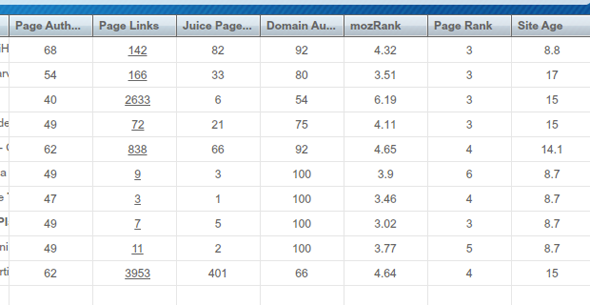
Spencer’s videos will show you how to interpret each column of data as you research your niche.
Try Long Tail Pro for free here.
HootSuite

Unlike many bloggers today, I’m not very reliant on automation, but when I do use it, HootSuite is my application of choice. It’s great for scheduling posts and finding other sites in your niche. I use the free version.
AWeber

This is one of the most popular email management systems online. Send one-off email broadcasts, blog broadcasts (automated mailouts of your new blog posts) or setup an autoresponder series.
The biggest regret I have about my business is not starting a list sooner.
With free search engine traffic getting harder to come by and social media platforms limiting your exposure to force ad spend (Facebook & Pinterest), it’s becoming even more important to build a list.
Google can lower your rank and take your traffic overnight, but no one can take your email list away from you.
Don’t hesitate with this step. Creating your list should be the first thing you do when you launch your site.
Foobar

This is a WordPress plugin that creates a notification bar on top of your theme. It’s a great way to announce promotions and special events.
Foobar is extremely flexible and even allows you to rotate multiple notifications and target them to different pages.
Video Tools & Software
Powtoon

If you want to liven up your content and make it more interesting and fun to read, Powtoon may be the answer for you.
Short, animated videos are known to be highly effective for converting sales and making tutorial-based content easier to absorb.
Below, you can see the intro video I created for my site WebsitePalace.com.
I signed up for the yearly subscription plan, and it was money well spent. I chose the Agency plan so I can have full access to all their animations, artwork, features, produce in HD quality, etc.
I also use their software to create some of the videos for my courses.
Powtoon also has free options. So if you aren’t ready to open your wallet, you can still use their service for free with limited features.
Take my course on how to use Powtoon.
Sony HDR CX-380 Handycam

This is the video camera I use for videos where you see me talking on YouTube.
It’s an HD camera and also has an input for an external mic. I also love that no media is required. All footage is stored on the camera’s hard drive so I simply plug the camera into my laptop with its attached USB cord to download footage.
This is my 3rd Sony HD camera. I am loyal to this brand simply because I am familiar with the settings and features.
Camtasia

This is the software I often use for screen recording videos. It’s pricey at $300, but there are much more cost-friendly options like CamStudio and Jing.
Obviously you get more features with a paid tool, but you may discover the freebies are enough!
Bamboo Tablet

In some videos I draw on the screen for illustration purposes. I use a Bamboo Tablet by Wacom. It works with Photoshop, Corel and other programs, but it also comes with software in case you don’t already have a compatible graphics program.
You can see me using this tool in the video below…
And here’s the video where I show you how it works…
They have a few different ones at various price points. This is the one I use.
I use this feature a lot in my courses to make the videos more interesting to watch.
Thanks Lisa, For sharing such knowledgable blog, It will help me to create my own website, Can you tell,is there any best and user friendly plugin for creating LMS for studens
Lisa you have some amazing tools here in your toolbox.
Thanks for sharing
Awesome informative post Lisa. I’ve been away for a while from marketing online and it’s good to know I can pay you a visit and stay abreast on certain trends concerning an online presence I’m currently working on re establishing.
I just got introduced to wordpress about 2 months ago. I think its a fantastic platform.
Thanks a lot for such an informative blog.
Though have worked mostly with wordpress but have long been longing for something new. I have done many projects on odesk and fiver but currently having problems with seo of Movies Website Could any one help.
Ooh, there are loads on this list I haven’t heard of – I’m going to be checking them out now for sure. 🙂
Hay Lisa,
How are you doing,
i am working on a website based on video theme like youtube. is there any youtube clone tube those i can use for my site.
Thanks
Devens William
Not that I know of but you can always hire a developer.
Greetings Lisa,
Are there free websites that will allow you to post affiliate links and if so, what are your thoughts on the subject. Huge thanks in advance.
Hey Lisa,
Thanks for putting me onto PowToon; that’s awesome. That is really good to know because I tried using Go Animate but the pricing is ridiculous and the website is finicky.
I loved the idea of FooBar but when I tried to download the plugin on WordPress I couldn’t find it. Do you know of any other plugin that does relatively the same thing? Anyway, great tips and great writing.
Thanks.
Hi Kim, try Hello Bar. They are free but with limits. I didn’t choose them because I didn’t like the monthly fee.
Hi Lisa ,
Actually am new here and this is my first comment on this blog. These lists are awesome but is instantWP and WampServer performing the same task? Reason being that few of my friend uses it and I’m kind of confused about the two.
This list is beautiful Lisa! InstantWP is so awesome, I can’t believe I never heard of it before!
BTW, I couldn’t help but notice this blog post page has a page ranking of 2! That is so cool. I would actually starting jumping out of joy if my blog’s homepage also gets a ranking of 1. 😀 😀 😀
Thank you.
LOL Thanks Adarsh, but did you know that Google stopped updating PageRank almost 2 years ago? So don’t fret if you don’t see it increasing. They no longer update it.
Damn it! Thanks for that info. I did read about that before, but I thought they just stopped using PageRank as a search engine ranking factor but PageRank’s were still given.
Nope. They also announced in 2014 that they would also stop updating the green bar. Here’s the article https://www.seroundtable.com/google-pagerank-dead-again-19482.html
Okay. Thanks very much for the help. 🙂 🙂 🙂
I used to blog regularly around 7-8 years ago (about SMS jokes and stuff), and gained page rank one within weeks or so. But then I quit after some time.
Now I have started from scratch, but now there are so many competitors that it is tough to build readership. Back then, I got 500 feedburner readers within months. 😀 😀 😀
It is very good that you have been in this industry since like 10 years or so. That is a huge benefit to you I believe in terms of goodwill.
Yes times have changed a bit haven’t they? lol
Lisa I enjoy watching your videos and your blog, you are an awesome teacher. Keep up the Good Work!!!
I have a question: I do use themes I made with Artisteer and also use Thrive script.
My question is what you think since you might already used them, also what you think of GENESIS FRAMEWORK is it good for blogs.
If you want to see my blog it’s here: http://www.atozofebusiness.com
Thanks!
Hi Siena!
Thank you!
I no longer use Artisteer. I only use Genesis. To say what is good for blogs is hard because they are all good for blogs. What you need to decide is what features are the most important to you for your blog? Do you want a full-width homepage? Are you going to be using a lot of images? Almost every theme is built for a blog. So that is quite a general question that is hard to answer.
So if you can tell me more about what features are important to you, I can answer that better.
Lisa – Using Artisteer makes it simple to design a theme as you can see on my site above, but when I post to the blog it does not show up same as back end. It looks different in the front end, that’s why I used Thrive themes, which is good, but kind of it saves the content in separate area in wordpress, that’s why I want to know more of what you think of the Genesis theme and is it worth buying, speaking of features simple theme with 3 columns.
Thanks!
I am a huge fan of Genesis. I’ve been using them since 2011 and now holds my personal record for using the same theme family. I bought their All Pro package 2 years ago so I have access to all their themes AND future themes. An amazing deal. I paid $400 but I just learned they are getting ready to turn that into a monthly fee. So glad I bought it when I did.
You can change any theme from a 1-3 column theme with ease and I like how they have a LOT of widgets so it makes it easy to customize various parts of the homepage, sidebars and even add a banner to the header or some kind of custom code.
I was also having compatibility with Artisteer and just fell in love with Genesis so I never went back. Didn’t know about Thrive.
This theme here is a Genesis Child Theme called Daily Dish Pro.
Oh and I forgot to add in my previous reply that you can watch me customize the Genesis themes here. That will give you an idea of how easy it is to customize. https://www.youtube.com/watch?v=LvO6ppJGwhQ
Thanks Lisa, I will watch your video on the Genesis theme. Thanks Again!
Pls suggest best WP Theme for Sports Website
Some great tips for someone starting in the web design game like me. Thx
Hi Lisa!
I clicked on the link for HYBRIDCONNECT and it redirected me to a site called “Thrive Themes” and immediately started a video. I clicked out because the video reminded me of those “spammy” videos from back-in-the-day (before Google cracked down on all that garbage).
Now, it might be legitimate but I just wanted to give you a “heads up”. You might want to investigate because your link might need to be updated.
Thanks for all the info!
Lizzie
Glad you told me! Just found out they’re taking Hybrid Connect off the market to introduce something new. Gonna remove that now. Thank you!
You’re welcome, Lisa. You’ve helped me out so much over the years. Glad I could finally pay you back in some way! (lol)
Thanks, Lisa. That is a great list of tool to help out. This is one of the better toolboxes that I have seen.
Hey Lisa!
You’re now the Princess of Internet Marketing because you’re so skillful and knowledgeable. Your ideas and tips are cutting edge and we want to tell you we appreciate it! We highly recommend your site. Keep up the good work and God bless! MSCSRRR HYPER CASH MILLIONAIRE SYSTEM
The tool box is awesome
I really enjoyed reading your blog, you have lots of great content. I look forward to reading more posts from you.
Thanks Marissa! I’ve got a new post/podcast coming out on Tuesday!
Great Post!!!!
Nice website! Really like the simple design and honest reviews that you have listed above. How long did it take you to start generating daily traffic from search engines? Have still been working on it myself but best of luck to you and keep up the great work!
Hi Lisa, I was very interested in reading about the promotional tools you used. I’ve heard of most of them a use a few myself. The most interesting I found was the 3rd Sony HD camera. I’ve been wanting to find a good handy camera, and thanks to now I have. Thanks a lot.
Angela
hi… Lisa thanks to share with us the tools you use, actually I was looking forward to use long tail pro, so after reading your post, I must start to use it. Thanks 🙂
It is great tools you have Liza … About GENESIS THEME ,,, Can we get File of HTML when We get this theme?
Themes are built with CSS and PHP. So when you install a theme on WordPress, your site design is automatically populated.
Hello Lisa,
How are you these days? I haven’t done anything even though I registered for your site about two years ago. I ready to learn from your site. So, where do I start my baby steps. Thanks in advance.
Hi Lisa, I’m currently building a list of my own and came across your blog. Great site by the way. I found it very resourceful. I wanted to mention that I’ll be releasing some software soon and hopefully you and your fans can use to create wonderful squeeze pages/sales pages/landing pages etc.
Hope to hear from you and you’re doing an awesome job with extremley valueable content Lisa!
Adrian from Sydney Australia!
http://www.imlistbuilding.com
Hi Lisa, I just stumbled upon your site very recently. I must say you have a ton of valuable knowledge for website building. I am really amazed how you have such very well documented tutorial sites. I really have learned a lot and I just launched my newly constructed website!! I look forward to read and learn more from your blog.
thank you.
thanks for sharing all these information
These tools are really helpful for me. I became big fan of you.
This a real great collection of awesome tools. A big thumb up for this article.
Hi Lisa
I am just curious…everyone advocates long tail keywords with low competition and relatively low monthly searches. 2createawebsite aka How to create a website is a very competitive area. Were you first on the scene when it was lower compitetion? Or did you break your rules and go into a competitive niche anyway?
That’s it John. I got in early and that was a huge advantage.
Can you tell me what the best things to do if you are a beginner, want something easy to start and want to get paid in PayPal? Thanks.
Your videos are excellent and more than very professional. I don’t know how you do it. They are interesting and educational too. This would cost too much to take a course in. Thanks again.
Lisa you have some amazing tools here in your toolbox.
I like the way that you have them listed out with some great details.
Thanks for showing the things that you use to make your site, videos and also marketing work unique.
Thanks Kharim
I actually thought of doing a video on this as this can be a very high earning page for your site. I know it has done well for me.
Yes you should do a video, Lisa.
Resources pages can be a good source of income because people will trust the tools and services that you use so that they can build a great site like you.
hi lisa ,
i am working since 10 years in this field and creats hundreds sites and blog for my clients and still i am creating. I have learned a lot but you are showing all the things in very simple language i wish i could found your site earlier .
thanks lisa for sharing such a nice info and please keep posting.